Innie Outie: Integrating a Playful Display Font into Professional Design Workflows
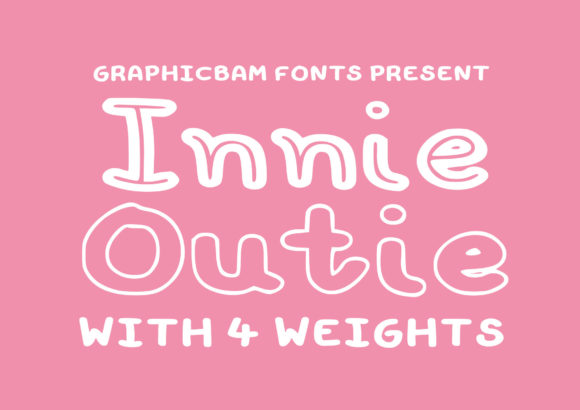
Selecting the right typography is rarely just about aesthetics; it is a strategic decision that impacts readability, brand perception, and user engagement. For designers, marketers, and content creators operating in sectors ranging from children’s education to casual gaming, the visual tone must align perfectly with the functional intent. This is where Innie Outie enters the workflow. As a fun and friendly display font, Innie Outie offers a distinct personality that can elevate cartoon-related designs, children’s games, or any creative project requiring a lovely, approachable touch.
However, integrating a display font with such specific character requires more than simply dragging and dropping text into a design tool. It demands an understanding of how this typeface interacts with broader design systems, target audiences, and production pipelines. This article explores how to effectively plan for, implement, and maintain consistency when using Innie Outie in professional projects.
Understanding the Role of Innie Outie in Visual Hierarchy
In any structured design process, hierarchy dictates what the viewer sees first. Innie Outie is not designed for body text or dense informational blocks. Its primary function is to capture attention and set a mood. The "innie" and "outie" aesthetic—often characterized by rounded edges, playful spacing, and a hand-drawn feel—creates an immediate sense of informality and warmth.
When planning a project, consider where this font fits within your visual hierarchy:
- Headlines and Titles: Use Innie Outie for main headers to establish a playful tone immediately.
- Call-to-Action Buttons: In gaming or educational apps, buttons labeled with Innie Outie can feel more inviting and less rigid than standard sans-serifs.
- Illustrative Accents: Pair the font with custom illustrations to create cohesive marketing materials for young audiences.
By defining these roles early in the planning phase, you prevent the common pitfall of overusing display fonts, which can lead to visual clutter and reduced legibility.
Compatibility with Other Design Assets
No font exists in isolation. When incorporating Innie Outie, you must evaluate its compatibility with other elements in your design system. Because Innie Outie has a strong personality, it pairs best with neutral, clean supporting typefaces. A simple sans-serif like Helvetica, Arial, or Open Sans provides the necessary contrast to ensure that secondary information remains readable.
If you are working in a team environment, document these pairings in your style guide. Specify that Innie Outie should never be used for paragraphs longer than two sentences. This rule helps maintain quality control and ensures that the font’s charm enhances rather than hinders communication.
Implementation Strategies Across Different Media
The implementation of Innie Outie varies significantly depending on the medium. Whether you are designing for print, web, or interactive applications, the technical considerations differ. Understanding these nuances allows for smoother execution and fewer revisions during the review process.
Print and Physical Materials
For physical products such as packaging, posters, or educational worksheets, Innie Outie shines due to its bold presence. However, print workflows require careful attention to resolution and color separation.
- Vector Formats: Always work with vector versions of Innie Outie (such as .AI or .EPS) to ensure scalability without loss of quality.
- Color Contrast: Ensure sufficient contrast between the text and background. The playful nature of the font can sometimes make thin strokes difficult to read if printed on low-quality paper or with low-contrast colors.
- Kerning Adjustments: Display fonts often have unique kerning pairs. Before sending files to print, manually check wide words to ensure consistent spacing.
Digital and Web Integration
In digital environments, performance and loading speed are critical. If you are embedding Innie Outie on a website or in a mobile application, you must optimize the font file to avoid slowing down load times.
Use tools like Google Fonts or Adobe Fonts if available, or convert the font to WOFF2 format for web use. Subsetting the font—removing unused characters—can significantly reduce file size. Additionally, consider fallback fonts. If Innie Outie fails to load, ensure the browser falls back to a similar rounded sans-serif to maintain the intended friendly vibe.
Workflow Efficiency and Consistency
For professionals managing multiple projects, consistency is key to maintaining brand integrity. Creating a standardized workflow for using Innie Outie can save time and reduce errors.
Preparation Phase
Before starting a new project, audit your existing assets. Do you already have Innie Outie installed? Is it the correct version with all required ligatures and special characters? Having the correct license and file ready prevents delays later in the process.
Create a template file in your preferred design software (e.g., Photoshop, Illustrator, Figma) that includes preset styles for Innie Outie. Define heading sizes, line heights, and color codes. This preparation step ensures that every new project starts with a consistent foundation.
Execution and Quality Control
During the design phase, focus on context. Innie Outie is ideal for cartoon-related designs, but it may clash with serious corporate messaging. Establish clear guidelines for when to use the font and when to switch to a more neutral typeface.
Implement a peer-review step specifically for typography. Ask colleagues to evaluate whether the font choice supports the message or distracts from it. This collaborative check helps catch issues related to readability and tone before final delivery.
Long-Term Use and Adaptation
Trends in design evolve, but certain typefaces remain staples due to their versatility. Innie Outie’s friendly and approachable nature makes it suitable for long-term use in brands targeting families, educators, and creative industries.
To keep your designs fresh, experiment with variations in size, weight, and color while adhering to your established hierarchy. You might use Innie Outie in large, bold letters for impact, or in smaller sizes for subtle accents. Just remember that its effectiveness relies on restraint and proper pairing.
Furthermore, stay updated on accessibility standards. While Innie Outie is visually appealing, ensure that your usage complies with WCAG guidelines for contrast and legibility. This is particularly important for educational materials and public-facing websites.
Integrating with Creative Tools
Modern design workflows often involve multiple tools. If you are using AI-assisted design tools or automated layout generators, ensure they support custom font integration. Some platforms may struggle with the unique shapes of display fonts, leading to unexpected rendering issues. Test your workflow end-to-end to identify potential bottlenecks.
Conclusion for Practitioners
Innie Outie is more than just a decorative element; it is a strategic asset for creating engaging, user-friendly designs. By understanding its role in visual hierarchy, ensuring compatibility with other assets, and implementing efficient workflows, professionals can leverage this font to enhance their projects. Whether you are designing a children’s game, a marketing campaign, or an educational resource, Innie Outie offers a lovely touch that resonates with audiences seeking warmth and playfulness.
Remember, the success of any design lies in the details. Pay attention to spacing, pairing, and context. With careful planning and execution, Innie Outie can become a reliable part of your creative toolkit, helping you deliver high-quality, impactful results consistently.